
Here’s something most shop owners never think about.
On your category pages, nobody is reading. They’re scanning. Eyes flicking across a grid of little boxes, deciding in a second or two which products are even worth a closer look.
That little box, the product card, is doing the actual selling. Not just your product page. The card.
And on most shops I look at, the product page gets all the love while the card, the thing people actually decide on, gets ignored.
I learned how much this matters by working on a variety of online stores. Product cards might seem like a small detail, but improving them often had a noticeable impact on performance. The product card is often the first thing customers see before they decide to add an item to their cart or click through to the product page. The clearer and more useful that first impression is, the easier it becomes for shoppers to make a buying decision.
So good product card design is not a “nice to have.” Great product card design helps shoppers make faster decisions and often leads to higher conversion rates.
What Makes a Product Card Design Actually Sell
Before we go deep, here’s the whole checklist in one place. A card that sells does these seven things well:
- Sits in a clean, scannable grid
- Shows the info that drives the decision
- Leads with your best products by default
- Lets people see more without clicking
- Nudges action with honest scarcity
- Uses badges to guide the eye
- Still works on a phone
Now let’s take them one at a time.
1. Get the grid right
Before any single card, look at how they sit together.
Aim for three to four products per row. That’s the sweet spot where people can scan and compare without feeling cramped or scrolling forever.
The grid is the frame, and the frame matters more than people think, because comparing is exactly what a shopper is doing on that page. Get this right and everything else has room to breathe.
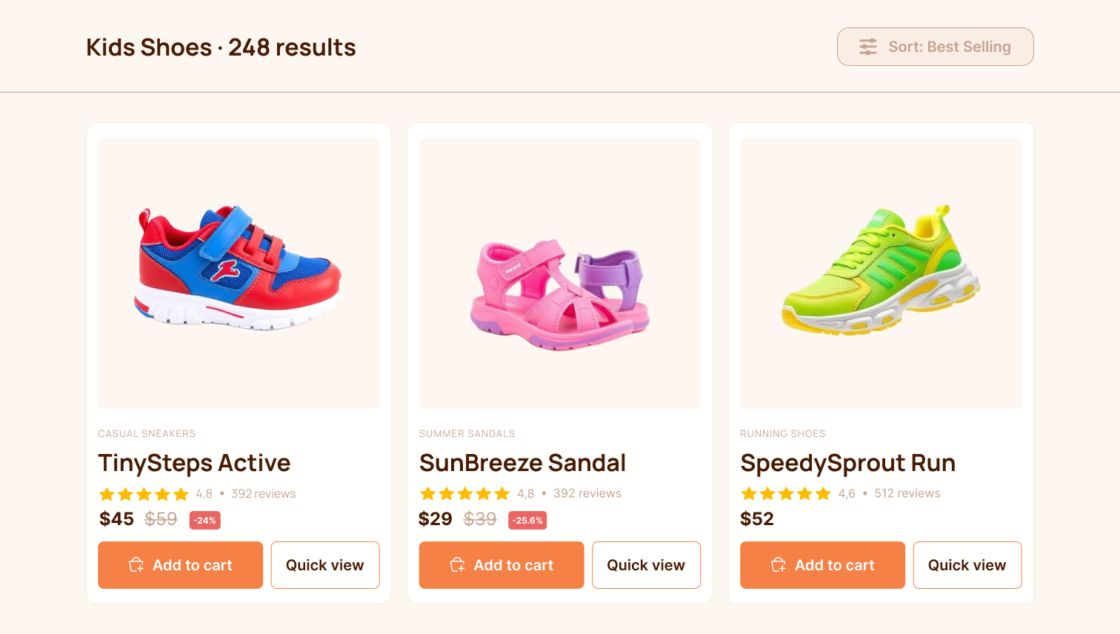
2. Put the deciding info on the card
This is where most cards either win or lose the sale.
A shopper glancing at your card is silently asking three things: is this for me, is it any good, and can I afford it. The card has to answer that without making them click.
Here’s what earns its place on the card:
- Product title – clear and readable.
- Price – and if it’s on sale, don’t just show the lower number. Show the original price struck through, the new price next to it, and the discount percentage. That little “30% off” pulls more weight than almost anything else on the card.
- Star rating and review count – 4.8 stars from 200 reviews sells itself. Social proof right on the card removes doubt before it forms.
- Key attributes – where it fits, show available sizes or colors so people don’t have to open the page just to check.
The rule behind all of it: every extra click is a chance for someone to lose interest and leave. Answer the basics on the card and you keep them moving toward checkout.
A quick example
Picture two cards for the same jacket.
The first shows a photo, the name, and a price. That’s it. To find out if it’s on sale, what people think, or whether it comes in their size, the shopper has to click in, wait, and dig. Many won’t bother.
The second shows the photo, the name, the old price struck through with “40% off” next to the new one, 4.7 stars from 130 reviews, and the colors it comes in. Same jacket. But now they already know it’s a deal, that others loved it, and that their color is there. They’re basically sold before they click.
Same product, same price, completely different result.
3. Lead with your best products by default
Here’s a quiet truth about online shoppers: almost nobody changes the sort order.
Whatever sits at the top of a category is what most people see, judge your shop by, and buy. So the default order is doing enormous work. Treat it like a decision, not an accident.
- Put trending, top-rated, or best-selling products at the top of each category.
- Lead with your winners and let the products that already prove themselves convince people about the rest.
A surprising number of shops just dump products in the order they were added. That’s leaving money on the table for no reason.
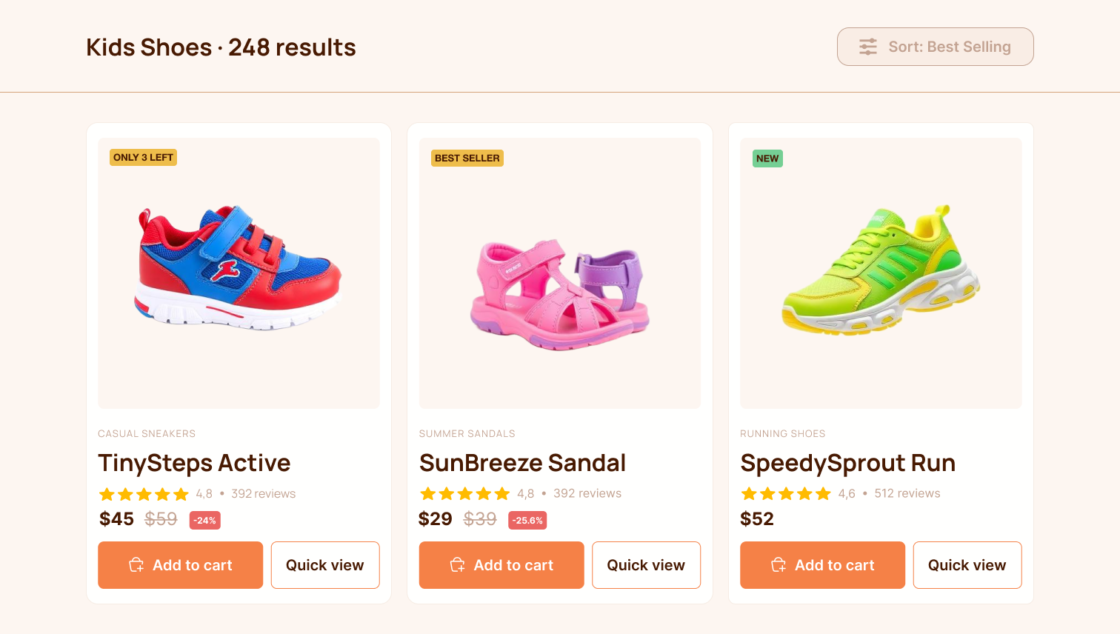
4. Let people see more without clicking
Two small touches here, both about reducing friction.
Hover images. When someone hovers over a card, show a second photo. A different angle, the back, the product in use. More detail without leaving the grid, and more detail means more confidence.
A clear call to action. This is the big one, and it’s really two buttons for two types of shopper:
- “Add to cart” right on the card, for confident buyers who already know what they want. They buy on the spot, no detour.
- “View product” or “Quick view” (usually on hover), for the undecided. They explore without cluttering the card or loading a full page.
The decided one buys now. The unsure one explores. Both get what they need.
5. Nudge action with honest scarcity
People move faster when they feel like they might miss out. That’s just how we’re wired.
So when stock is genuinely low, say so. A small “Only 1 left” or “Low stock” label turns “I’ll think about it” into “I’ll grab it now.”
The key word is genuinely. Fake scarcity gets noticed eventually, and once a shopper feels tricked, the trust is gone. Use it where it’s true and it works beautifully.
6. Let badges do the talking
Badges are the little labels that help the right products stand out at a glance. Used well, they guide the eye and add instant context.
A few that earn their spot:
- Best Seller – the products with the most orders in their category.
- New – recently added items.
- Trending – a sudden spike in views or add to carts.
- Fast Delivery – ships within a day or two (often the thing that tips a hesitant buyer over).
- Top Choice – your store’s pick, based on the best combined score across ratings, returns, and sales.
- Coupon code – surfaces an active discount tied to that specific product.
Don’t slap a badge on everything though. If every product is a Best Seller, none of them are. Badges work because they’re selective.
7. Don’t forget the phone
One last thing, and it’s a big one: most of your shoppers are probably on their phone.
Good product card design also has to survive on a small screen. On mobile you usually drop to one or two cards per row, hover doesn’t exist, and space is tight. So the card has to be even more ruthless about showing only what matters.
- Lead with the price, the deal, the rating, and a clear way to buy.
- Replace hover tricks with a tap.
- Make buttons big enough to press with a thumb.
A card that looks great on your laptop but turns into a cramped mess on a phone is still a card that’s losing you sales. Check both, every time.
So what do you actually do with this?
You don’t need all of this at once. But next time you look at your shop, don’t open a product page. Stop at the category page or main shop page and look at one single card like a stranger would.
Ask yourself:
- Can I tell what it is, what it costs, and whether it’s any good, in about two seconds?
- Is the deal obvious if it’s on sale?
- Is it clear how to buy it?
If you hesitated anywhere, that’s your highest-leverage fix, and it’s almost never a full rebuild. It’s tightening the one little box that’s doing all the selling.
Your product page closes the sale. But your product card decides whether anyone ever gets there.
If you’re thinking about creating a new webshop, here’s a quick guide to what you need to know before getting started.
Takeaway
On a category page or main shop page people scan, they don’t read. The product card is your real salesperson, so give it the info, proof, and clear action a shopper needs to say yes before they even click.